Best Construction Project Management Software in the UK: 2026 Edition



Updated and reviewed in June 2026
Why is the demand for construction project management software increasing, no matter what country the business is operating in? The reason is that builders can hardly stay competitive without digitalizing their processes.
UK builders looking for construction project management software most likely have already tried to make spreadsheets and email work. However, there are some issues that the spreadsheets were never built to solve, for example, variations.
The alternative of a workflow you know well may sound risky, but the need to navigate the complexities of managing multiple subcontractors, variations, and CIS compliance is critical.
In this review, I will look at the best construction project management software in the UK in 2026. Let’s review each tool and explain what exactly it can do to streamline your construction workflows.
Table of Contents
- What Construction Project Management Means in the UK
- What Stops Builders from Committing to Software?
- Key Construction Project Management Features for the UK Builders
- Construction Project Management Software to Choose in the UK
- Construction Project Management Tools Compared
- Conclusion

Benefits of Using Construction Project Management Software in the UK
The construction industry is traditionally slow to digitize, and this is typical for different countries. However, using construction management software has become a common practice as it is a necessary tool to survive the competition.
Around 70% of UK construction companies now use some form of digital project management software, and the numbers will grow.
Besides, there are specific laws, such as the Building Safety Act in the UK. This law requires keeping a digital “Golden Thread”, a complete and up-to-date record of safety-critical information during the entire project to ensure regulatory compliance. The benefit of using software in this case is that you have document management, daily reports, and collaboration in one place.
Recommended reading:
What Stops Builders from Committing to Software?
Many contractors know that switching to software will simplify their daily operations, but deciding which platform to use is another thing. Here, builders, especially those using a construction project management tool for the first time, get stuck.
From the experience of Buildern users, some questions come up most often once a builder is seriously evaluating the options. Let’s see what matters.
Replacing Spreadsheets Entirely
For first-time users, the question of whether software can completely replace spreadsheets is crucial. Many contractors still use Excel for cost tracking, documenting variations, and email for requests for quotes.
The answer depends on whether the software connects estimating, budgeting, procurement, and communication in a single workflow.
Syncing with Accounting Software
This is the concern that is likely to arise during a demo call. The concern isn’t just if an integration exists, but how the sync works. Does billing sync automatically? Is a CIS deduction applied? Does software support VAT?
The construction project management is better to have the two-sync accounting integration to eliminate the double-entry problem and the need to buy third-party apps to connect finances.
Onboarding Complexity
This issue may ruin software decisions more often than any feature gap. Builders who paid for a platform and spent weeks on setup and implementation fear taking another risk.
The honest answer is that onboarding takes time, but it should be a reasonable timeframe. The best is to choose a tool with a free trial to understand if you can work with it (even though there may still be onboarding to go deeper).
Key Construction Project Management Features for the UK Builders
For UK builders, a construction project management tool is more than a digital diary, but also a financial tool. What matters is how well a platform supports the way UK builders actually run projects contractually and financially.
A platform that works well in another market may fall short in the UK. For example, in the UK, invoices must handle VAT correctly.
In addition, construction businesses frequently operate under the Construction Industry Scheme (CIS), which is specific to the UK construction sector. Under CIS, contractors are responsible for deducting tax from payments to subcontractors and reporting those deductions to the Revenue and Customs Department.
These are the capabilities that matter most:
Accounting Integration: Most UK builders use Xero, QuickBooks, or Sage. A tool with integrations with these accounting platforms ensures that financial data flows smoothly.
VAT and CIS: Software must handle VAT on invoices and support CIS deductions (typical rate is 20%), tracking each subcontractor’s tax status to ensure compliance.
Variation and Retention Management: It is a standard part of UK construction projects, particularly under JCT and NEC contracts. Builders need to record, price, approve, and track variations while monitoring retentions, linking everything to budgets and valuations.
Document Control: With the Building Safety Act, maintaining a “Golden Thread” of project information is mandatory. Software should manage RFIs, diaries, and document versions easily.
Let’s see the list of software I picked that can match these requirements.
Construction Project Management Software to Use in the UK
This list contains tools that are designed for contractors of different sizes and segments. Some giants are used mainly in the UK, are made for the local workflow, and are ERP systems rather than construction software. The others are for different types of contractors focused on:
- Small/medium-sized projects
- Enterprise-level jobs
- Field tasks
As for the UK-focused criteria, the listed tools have the necessary elements like support for CIS or accounting integrations. My evaluation is based on a mix of verified user reviews (e.g., G2, Capterra) and official product documentation and features listed on the websites.
Buildern
Best for UK residential and commercial builders with full support for all cycles of construction from estimating to communication.
Buildern is an end-to-end construction management software built to handle the realities of UK projects. Everything is structured around how builders actually run their jobs and can fully replace spreadsheets and manual workflows.
Core Project Management Features
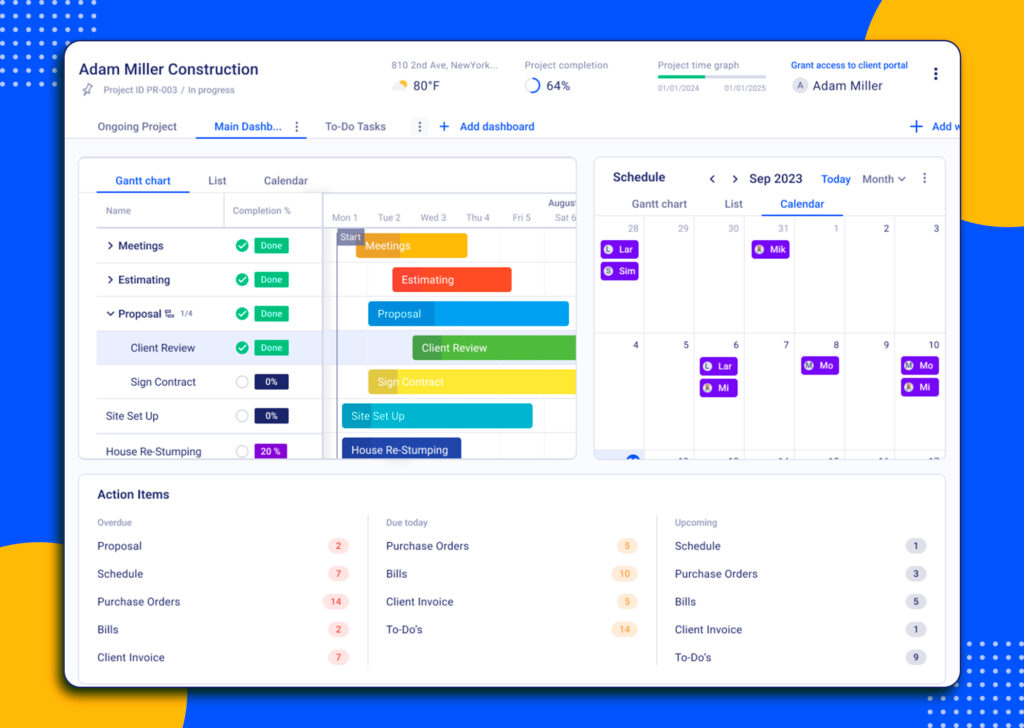
Buildern makes it easy to schedule tasks, set timelines, and track milestones in one place. Builders can see what’s happening across projects at a glance, set dependencies, assign responsibilities, and quickly adjust schedules.
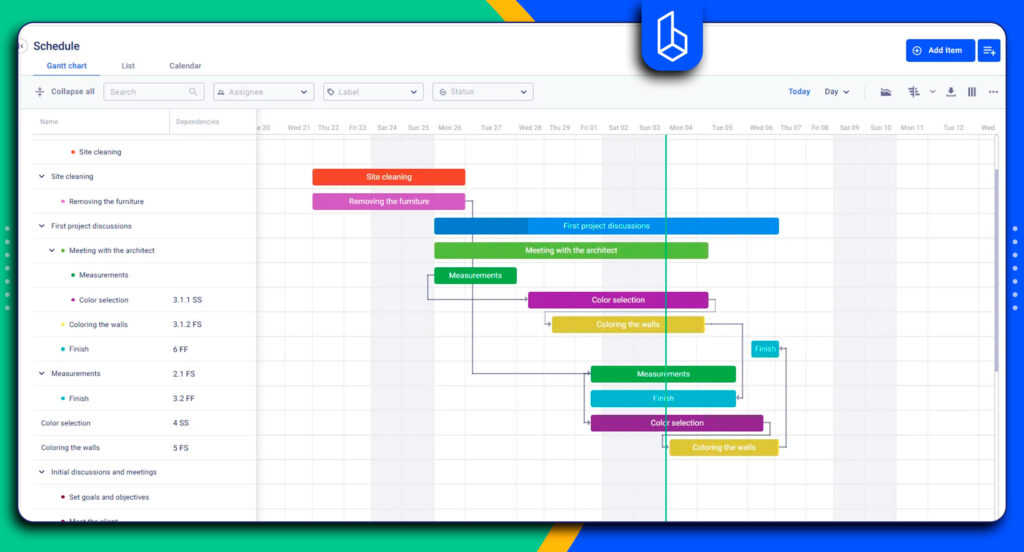
And, information is visible not only to contractors and project managers but also to clients and subcontractors through dedicated portals. Teams can view schedules and updates in real time, which improves communication.
Besides, our software has strong financial modules with real-time insight into budgets, job costs, and cash flow across all projects. Financial dashboards make it easy to see where money is being spent, track committed costs, and identify potential overruns before they become a problem.
All this information is accessible on mobile devices with more flexibility for project managers and site teams.
Features for UK Construction Workflows
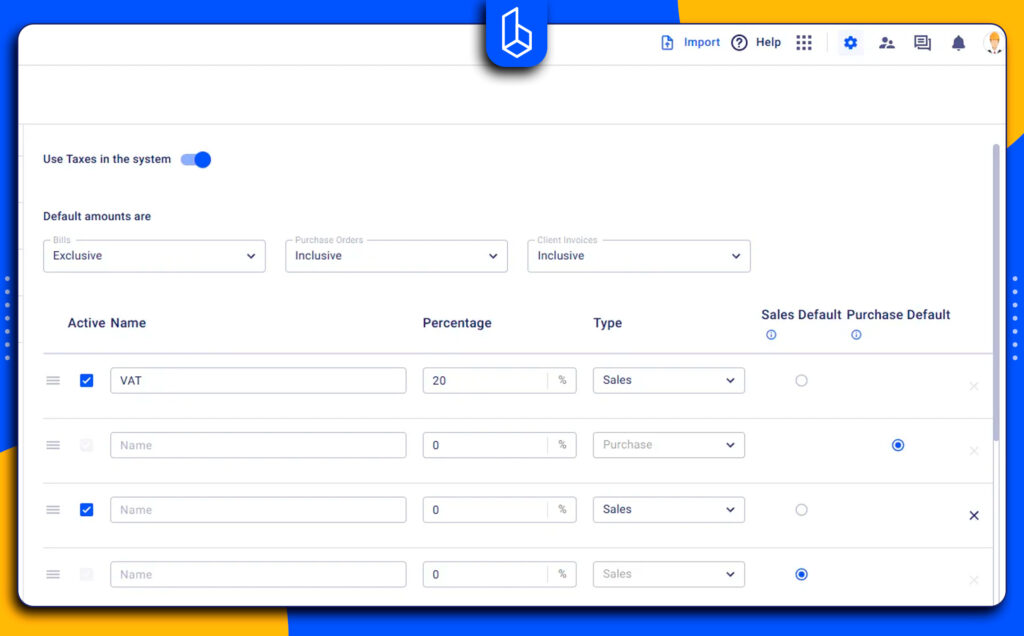
UK builders can set VAT rates in the software, choose payments in pounds, and manage all financial settings according to local rules, making sure invoicing and reporting are accurate from day one.
Buildern also offers two-way integration with Xero. It’s also important in terms of the CIS deduction used in the UK.
For example, if your accounting is in Xero and you apply a 20% CIS deduction for a subcontractor, the bill comes into Buildern with the total mentioning the CIS deduction, and this information is automatically synced. This eliminates double entry and keeps financial data aligned across platforms.
Retention and variations are also fully supported. Moreover, every change is linked to budgets, valuations, and schedules, so you always have an accurate picture of project finances.
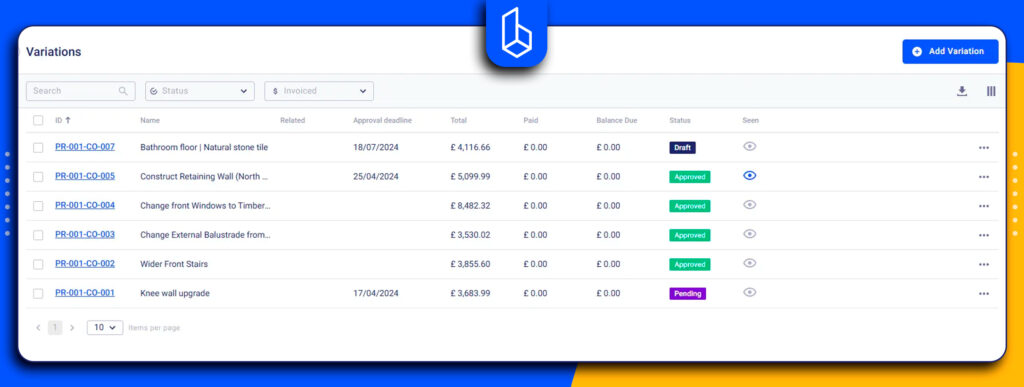
What is also important for the UK contractors, critical documents are always up-to-date and easy to access. Buildern makes document control simple and reliable, which is especially important for commercial projects. RFIs and Submittals are fully integrated, allowing teams to submit, track, and respond to queries or document approvals quickly.
You can also check:
Pros
- All-in-one project management features with a strong focus on estimating and financial management
- Two-sync integration with QuickBooks and Xero
- Built-in VAT handling
- Variation and retention management
- Task management features
- Easy onboarding and intuitive interface
Cons
Not for enterprise-level teams yet
Pricing
Buildern offers clear, straightforward pricing. Most features are included in the starter package at £169 a month, billed annually. Builders can access scheduling and financial management without extra costs.
Real-user review: “I appreciate the simplicity of Buildern’s setup process, which required minimal implementation time compared to other software we’ve used, which took weeks or even months. This efficiency has allowed us to become operational swiftly, saving us significant time. Buildern’s comprehensive capabilities, from handling everything involved in project management to bid soliciting and cost tracking, have streamlined our operations, making us much more efficient. The software has organized our entire business, drastically reducing the time required for bid solicitation and leveling from a full day to just 30 minutes. The financial insights provided by Buildern for project profitability are exceptionally useful, allowing us to make informed decisions. Overall, Buildern offers the best value among other competitors, with all the necessary features we require, facilitating seamless integration with other tools like QuickBooks. The amount of time it has saved our team and the organizational benefits it has provided to our company make it a decision I would definitely repeat.” Brent. B., G2
Procore
Best for contractors and enterprise-level construction firms.
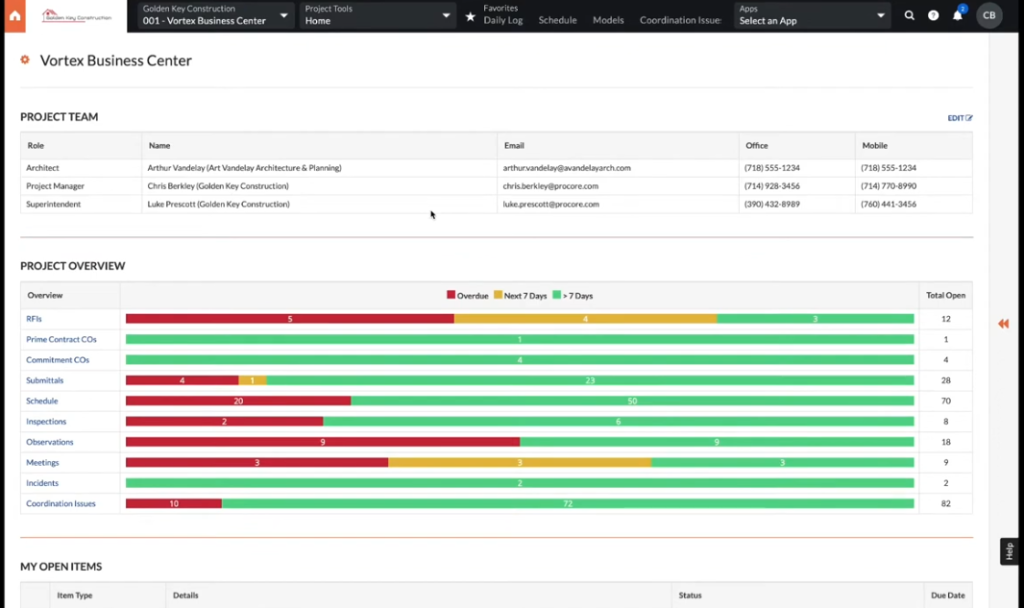
Procore is a construction software offering tools for scheduling, daily logs, RFIs, drawings, inspections, and quality and safety management. These features are particularly useful for large commercial projects where multiple stakeholders need visibility into site activity.
Procore’s depth on large, complex projects is real, and it can be used in the UK, and large contractors do use it successfully. But it is not built specifically around UK construction workflows.
Many users report a steep learning curve with Procore, especially for non-technical teams who need time and training to navigate its complex features. In general, it is not practical for small teams and residential contractors, as the price tag is too high.
Pros
- Deep project management features
- Powerful estimating module
- Equipment management
Cons
- Cluttered user interface
- Long onboarding and implementation
- Very expensive
Pricing
It is one of Procore’s most discussed drawbacks. Procore uses a volume-based pricing model, typically tied to annual construction volume rather than fixed plans. This means costs are unpredictable as they increase as your business grows.
Real-user review: “A drastic reduction in communication errors. I save a lot of time by avoiding unnecessary back-and-forth and I ensure that everyone is working on the same versions of the plans. The price is very high, which makes it more suitable for large projects or big companies. I’ve also noticed that the mobile app consumes a lot of battery and data, which is sometimes problematic on isolated job sites.” Patrick. K
Access COINs
Best for construction businesses that need deep accounting, payroll, and compliance capabilities․
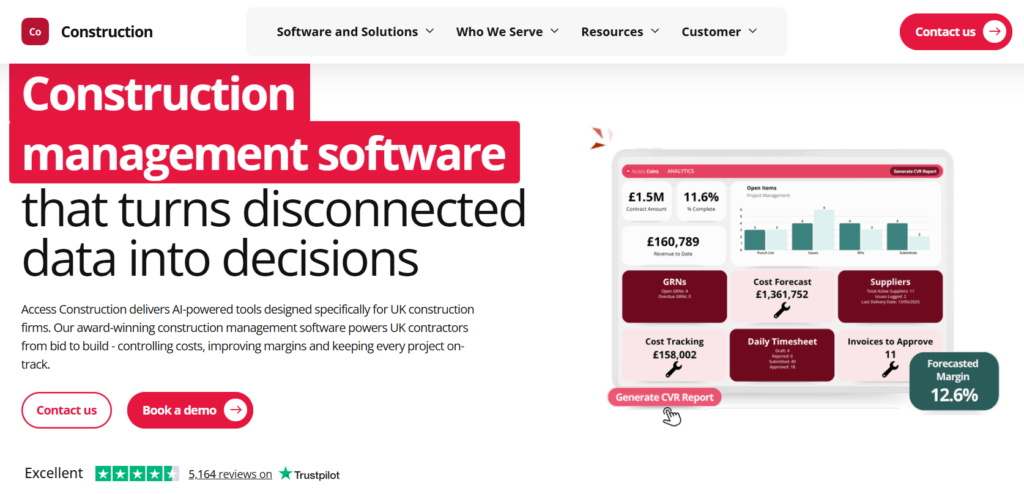
Access COINs is a project management platform for UK firms. It has a stronger focus on finance, payroll, and compliance. The tool is mainly used by medium to large-sized contractors, but it is often positioned as a back-office system rather than a lightweight project management tool.
It has powerful financial modules, and it’s logical, as ERPs usually tend to outperform general platforms in payroll or compliance tracking. Besides, project management workflows are not as user-friendly as in the case of other tools.
Pros
- Strong job costing, budgeting, and financial reporting
- Highly-rated purchase order management
Cons
- Day-to-day usability is inconsistent
- No free trial, custom pricing only
- Onboarding requires a real investment in training
Pricing
The prices are custom and enterprise-based, rather than publicly listed. Implementation and training can also require a significant time investment.
Real-user review: “Organization and support through project implementation. Had a very detailed project plan, and managed tasks and scope well. As far as the product itself, would the ease and intuitiveness of navigating the menus. Bank reconciliations can be difficult if the bank export of data doesn’t match COINs required import format. Can end up being a very manual and time-consuming process. On Reports, there can be almost too many options to select when running reports, where if you’re not doing it consistently you can get different results. For example, two people who think they are running the same report might get different results.” Tim. S.
Archdesk
Best for large main contractors and specialist subcontractors.
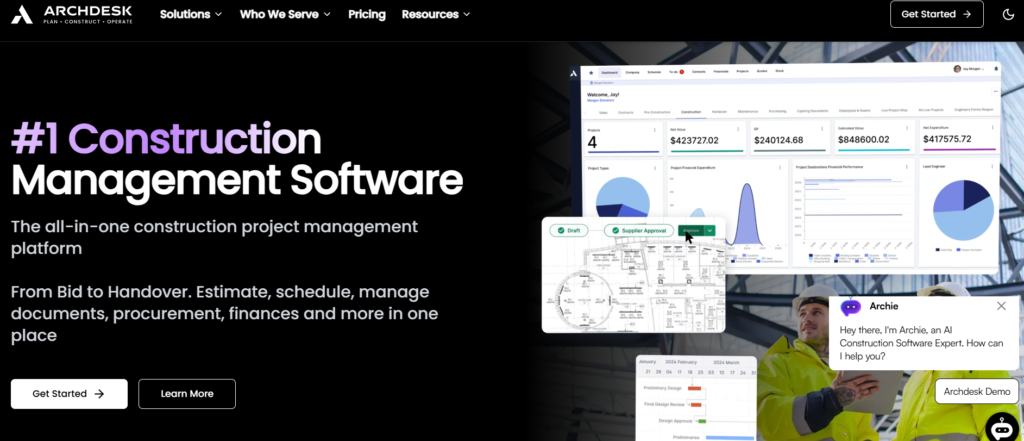
Archdesk is a UK-based construction project management platform designed primarily for main contractors. It focuses heavily on commercial project delivery, combining project management with financial controls and contract administration.
Archdesk is more useful for commercial and contract administration. The platform offers features for UK workflows, but some features, for example. quote-building process is flagged by users as too complex to configure and use. Reviewers also point to limitations of the mobile app, which lacks some features.
Pros
- Centralises estimates, quotes, and invoicing
- Strong, responsive customer support
- Good cross-department visibility
Cons
- Mobile app has download issues
- Quotation building is time-consuming
- Valuations and timesheets are mentioned by reviewers as needing improvement
Pricing
Although it is positioning itself as a tool for general contractors and subs, it clearly has a high cost, especially for small builders. The Essential plan fee starts at ~£690/month.
Real-user review: “Easy to configure changes and get the system up and running. System looks good and is easy to use. The layout on some of the screens cannot be amended/shrunk, which means you cannot fully customise your view to how you want it.” Melissa M.
Fieldwire

Best for builders who need a field-focused project management tool.
Fieldwire is designed to fit all the needs of the site teams. It helps contractors track tasks, assign responsibilities, and manage punch lists. The focus is on collaboration between the office and site.
The software supports RFIs, daily reports, variations, and basic document control. It’s important to note that it is a task and document platform rather than an all-in-one project management tool.
All positive reviews praise the plan viewing and task tracking. However, the users note limitations within financial management. To put it straight, financial management is minimal, and modules must be handled in separate accounting tools.

Pros
- Genuinely field-built with good real-time sync between site and office
- Highly rated for task management
- BIM viewer
Cons
- No estimating, budgeting, invoicing
- Viewing quality lag on large, complex drawing sets
- Limited customization
Pricing
Fieldwire uses a per-user subscription model, which can increase as teams grow.
Real-user review: “What I like most about Fieldwire by Hilti is that it keeps all project information in one place and makes communication between the field and the office much more efficient. Being able to access plans, track tasks, add photos, and update progress in real time helps reduce errors and saves time that would otherwise be spent on coordination. It’s especially helpful for keeping everyone on the same page, staying aligned day to day, and maintaining clear, consistent documentation on site.
One drawback of Fieldwire by Hilti is that it can feel a bit limited when handling more complex project tracking or reporting needs. Sometimes the interface can be slightly slow or less intuitive, especially when managing a large number of tasks or sheets. Additionally, when I exit a plan and return to it, it resets back to the top of the sheet, so I have to scroll all the way back to where I was working. This can be time-consuming, especially on large plans.” Shubham B.
Houzz Pro

Best for small and mid-level designers, builders, and contractors.
Houzz Pro is a project management platform, but as compared to other tools, here the focus is also on the designers.
It combines CRM, 3D floor plans, estimating, scheduling, and marketing in one system. Reviewers praise its takeoff and 3D rendering tools.
However, limitations in the financial management tools are among users’ concerns. For example, the change order cannot reflect negative values. One of the reviewers says there’s no way to void and resend an invoice despite tutorial videos suggesting otherwise.

Pros
- Residential project management workflows
- Clip Tool and 3D visualisation
- Integrated lead generation
Cons
- Job costing and expense tracking are limited
- No Xero integration
- Customer support quality is inconsistent
- Steep learning curve
Pricing
Detailed plan pricing is not available on its website. To get exact monthly figures, the customer has to request a demo.
Real-User Review: “While the platform itself has some useful features, the lack of consistent support and professionalism has made it difficult to rely on Houzz as a true business partner. Unless things improve dramatically, I’ll likely be moving on when my contract ends. I’ve been using Houzz Pro for several months and had high hopes for the platform, but I’m honestly disappointed. On two separate occasions, no one showed up to scheduled meetings—without notice or follow-up. As a construction professional, my time is valuable, and these repeated lapses in communication are unacceptable.” robert S.
PlanRadar

Best for subcontractors and project managers who need a mobile-first solution.
PlanRadar is designed to help teams track tasks, manage defects, and document progress using mobile devices or desktops.
The focus is on recording defects and conducting safety inspections. It’s not a project management or financial management tool in the way Buildern, Procore, or Access COINS are.
However, it has no native support for VAT, CIS deductions, retention tracking, or detailed budgeting. The reviewers praise its reporting and documentation strength, which provides an audit for resolving disputes and reducing rework.
According to reviews, mobile performance is a repeated issue, and there are complaints about slow syncing and lag on larger projects.
Pros
- Strong real-time reporting and document control
- Fast onboarding
- Responsive customer support
Cons
- Slow mobile performance
- Limited customisation of reports and workflows
- No estimating, budgeting, or financial management
Pricing
PlanRadar has a per-user subscription model from £23.
Real-user review: “The blueprint pinning and automated PDF reporting are game-changers. Being able to walk the site, log a punch-list item on the exact spot of a digital drawing, and instantly generate a professional report saves our team hours of administrative work every week.The mobile synchronization can sometimes feel sluggish, especially when handling massive, multi-layered drawings over weaker data connections. Additionally, the lack of deeper native integrations with standard accounting software means duplicating some entry work.” Akansha C.
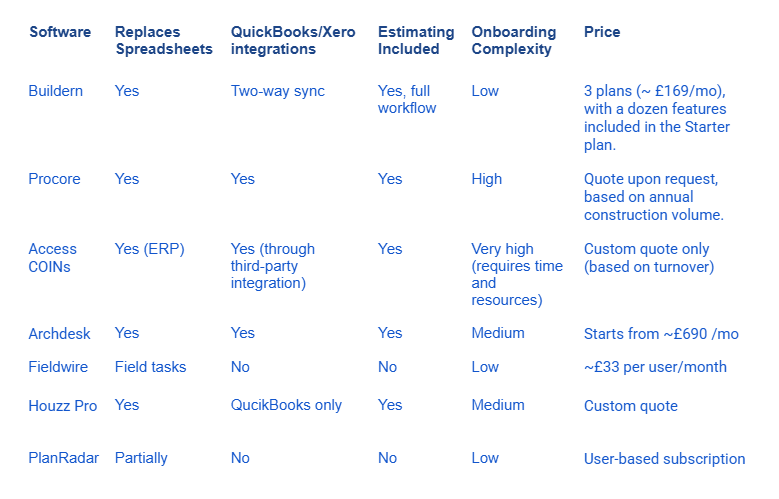
Construction Project Management Tools Compared
Conclusion
In 2026, UK builders need tools that do tasks around financial control, estimating, and document management while keeping projects on schedule.
Before choosing, consider the following:
- Match the tool to your pain points: Choose software that can overcome all daily challenges.
- Test UK compliance: Ensure the software handles VAT, CIS deductions, and documentation flow effortlessly.
- Try it in the field: Mobile usability matters. If your foremen or subcontractors can’t use it easily, it won’t work on-site.
In the UK and beyond, choosing the right software today isn’t just about convenience but about protecting your business, improving efficiency, and staying competitive in 2026.

What Is Construction Project Management Software in the UK?
It’s a project management software that helps builders plan, track, and manage projects, including scheduling, budgets, documents, change orders, and work with subcontractors and vendors.
Why Do UK Builders Need Construction Project Management Software?
UK builders use project management software to save time, reduce errors, track costs, manage variations, and keep a complete “Golden Thread” of project data. The latter is essential for compliance, efficient workflows, and staying competitive.
How Much Is Construction Project Management Software Cost in the UK?
Pricing varies by platform, team size, and features. Some tools have clear plans, while others use custom quotes or volume-based pricing that grows with your business.